Manage your time loop with Curtiss-Hirschfelder equation#
In this example we solve the Curtiss-Hirschfelder equation
with stiff parameter \(k=50\) and initial condition \(y(0) = y_0 = 2\). As the name of the \(k\) parameter suggests, this is a stiff equation, so the time step could be constraint by the value of this parameter if we solve this equation with an explicit Runge-Kutta method.
In this case, we need a small time step at the beginning of the simulation, but next, close to the equilibrium we can get larger time step. We can’t do that with ponio::solve() function because we need to change the current step during the simulation. We will use a ponio::solver_range class and access to it with a ponio::time_iterator to manage the time loop.
First of all, we write the problem, in this case the state will be stored into a double, so we don’t specify a state_t for the sake of simplicity.
15    double k = 50.;
16
17    auto curtiss_hirschfelder = [=]( double t, double y, double& dy )
18    {
19        dy = k * ( std::cos( t ) - y );
20    };
Next we prepare our simulation, time span, time step, and initial condition
22    ponio::time_span<double> const t_span = { 0., 2. }; // begin and end time
23    double const dt                       = 0.01;       // time step
24
25    double y_0 = 2.;
ponio::solve function#
The standard function to solve a ODE in ponio is with the ponio::solve() function
27    auto obs = "curtiss_hirschfelder_solve.txt"_fobs;
28
29    ponio::solve( curtiss_hirschfelder, ponio::runge_kutta::rk_33(), y_0, t_span, dt, obs );
The full example can be found in curtiss_hirschfelder_solve.cpp.
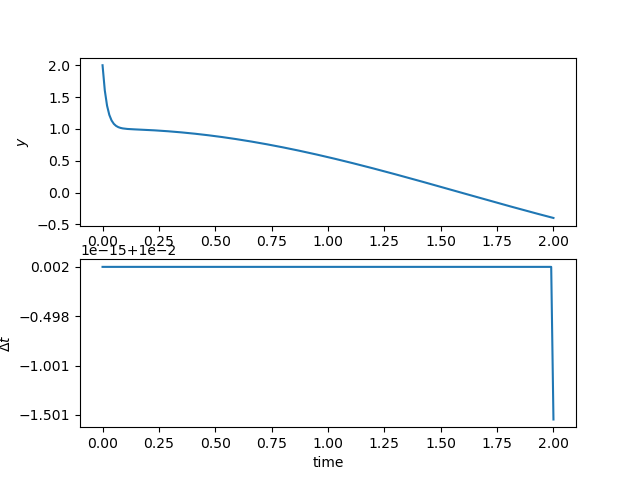
Solution and time step history#
A while loop#
With the ponio::solve() function we can’t manage solution, or time step. To do this we need a ponio::solver_range
29 auto sol_range = ponio::make_solver_range( curtiss_hirschfelder, ponio::runge_kutta::rk_33(), y_0, t_span, dt );
This object is range in C++20 meaning, so we can iterate on it with a ponio::time_iterator object
30 auto it_sol = sol_range.begin();
This kind of iterator can be incremented (++it_sol), and we can access to its stored data with * operator (*it_sol) and get a tuple with \((t^n, y^n, \Delta t^n)\). We can also access with -> operator with it_sol->time for \(t^n\), it_sol->state for \(y^n\) and it_sol->time_step for \(\Delta t^n\). All information contains in this iterator is summarized in the following diagram:
![@startjson
#highlight ** / "type"
{
"type": "time_iterator",
"sol": "<math>(t^n, u^n, Delta t^n)</math>",
"meth": {
"type": "method",
"is_embedded": false,
"alg": {
"type": "explicit_runge_kutta",
"butcher": {
"type": "butcher_tableau",
"A": [
"<math>[ [0, 0, 0], [1/2, 0, 0], [-1, 2, 0] ]</math>"
],
"b": [
"<math>[ 1/6, 2/3, 1/6 ]</math>"
],
"c": [
"<math>[ 0, 1/2, 1 ]</math>"
]
},
"info": {
"type": "iteration_info",
"error": 0.0,
"success": true,
"is_step": false,
"number_of_stages": 3,
"number_of_eval": 3,
"tolerance": 1e-5
}
},
"kis": [
"<math>k_1</math>",
"<math>k_2</math>",
"<math>k_3</math>"
]
},
"pb": "<math>f : (t,u) |-> f(t,u)</math>",
"t_span": [
0.0,
2.0
],
"it_next_time": 2.0,
"dt_reference": 0.01
}
@endjson](../_images/plantuml-c373f0827d43c57e8c9efac3ffbc804bff30cc4e.png)
Summarize of time_iterator class#
To manage the time loop we write a while loop
32    while ( it_sol->time < 2. )
33    {
34        obs( it_sol->time, it_sol->state, it_sol->time_step );
35
36        // pseudo adaptive time-step method
37        if ( it_sol->time < 0.5 )
38        {
39            ++it_sol;
40        }
41        else
42        {
43            it_sol->time_step = 0.05;
44            ++it_sol;
45        }
46    }
47    obs( it_sol->time, it_sol->state, 2. - it_sol->time ); // to save iteration where it_sol->time == tf
We can access in read and write to data in iterator.
The full example can be found in curtiss_hirschfelder_while.cpp.
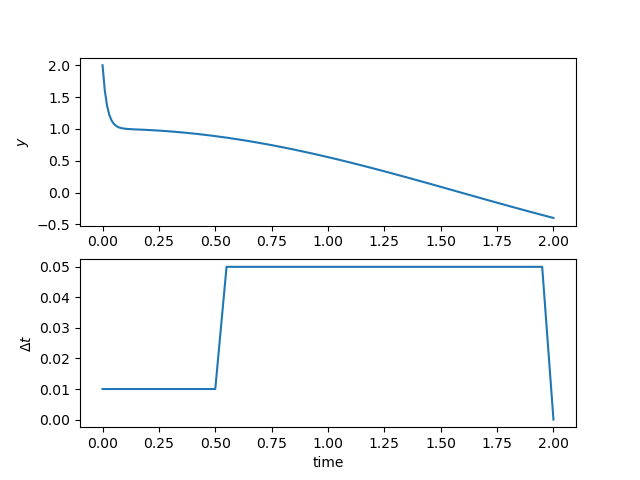
Solution and time step history#
A for loop#
Like for a while loop, we need to build a ponio::solver_range and iterate on it by using a range-based for loop.
29 auto sol_range = ponio::make_solver_range( curtiss_hirschfelder, ponio::runge_kutta::rk_33(), y_0, t_span, dt );
If you want to modify the tuple \((t^n, y^n, \Delta t^n)\) we need a reference :
for ( auto& ui : sol_range )
// ...
Else we can just use a value
for ( auto ui : sol_range )
// ...
The complet for loop is the following
31    for ( auto& ui : sol_range )
32    {
33        obs( ui.time, ui.state, ui.time_step );
34
35        if ( ui.time < 0.5 )
36        {
37            ui.time_step = 0.01;
38        }
39        else
40        {
41            ui.time_step = 0.05;
42        }
43    }
The full example can be found in curtiss_hirschfelder_for.cpp.
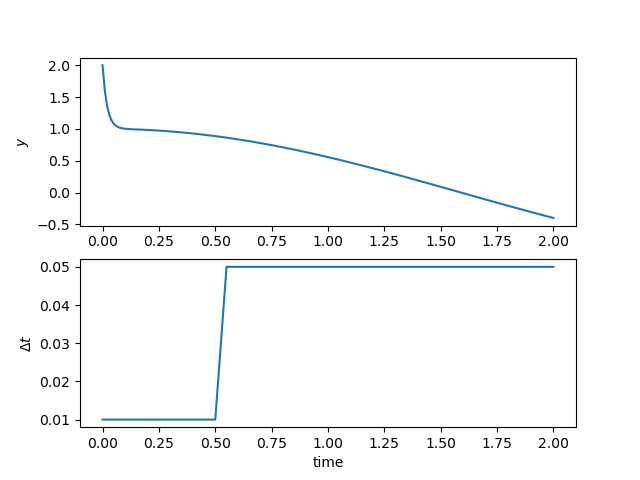
Solution and time step history#